
 kevinveenbirkenbachandClaude Opus 5
37b735cf7b
kevinveenbirkenbachandClaude Opus 5
37b735cf7b
Each volume is copied twice into the same destination: once hot with the
container running, once cold after it is stopped. The cold pass is meant to
correct the hot one, but it uses rsync's quick check, which compares size and
whole-second mtime.

A pre-allocated 16 MiB WAL segment never changes size. When its last pre-stop
write and postgres' shutdown checkpoint fall in the same whole second, the cold
pass skips it while still replacing global/pg_control, whose previous write was
seconds earlier. The generation then holds a post-shutdown pg_control pointing at
a checkpoint LSN whose WAL bytes are still zero. Restoring it gives

    invalid record length at 0/3CB7A20: expected at least 24, got 0
    invalid checkpoint record
    PANIC: could not locate a valid checkpoint record at 0/3CB7A20

and postgres crash-loops until the restore test gives up after 1200s. Observed in
infinito-nexus-core CI run 30586213932, debian leg; the centos leg of the same
run restored cleanly, and the two generations differ by exactly one 16 MiB WAL
segment.

authoritative is a required keyword rather than an optional flag, so each of the
four call sites states which pass it is. Set, it adds --checksum, so the cold
pass compares content. The hot passes keep the quick check.

Reproduced with real rsync in both directions: without --checksum the WAL stays
zero while pg_control is post-shutdown; with it the pair is consistent. Hardlink
dedup against --link-dest is unaffected, measured at 20/20 with generation size
unchanged.

Rejected alternatives, both measured rather than argued: --ignore-times destroys
dedup (20/20 to 0/20 hardlinks, generation 36 to 72 MiB), and --modify-window=-1
makes correctness depend on the destination filesystem preserving sub-second
mtimes, which silently degrades on NFS or ext3.

COST. The quick check scales with file count; --checksum scales with bytes, read
on both sides, and it runs while the container is stopped. Measured warm-cache on
215 MiB: 0.10s to 0.39s, a factor of 3.9. Derived for disk-bound runs, the extra
stop time stays under a minute up to roughly 4 GB on spinning disk, 15 GB on a
SATA SSD, 60 GB on NVMe. At 1 TB it is 17 minutes on NVMe and over three hours on
spinning disk; at 10 TB it is hours to days. No size threshold is built in - a
guessed one would drop the guarantee exactly where an unrestorable backup costs
most. Volumes at that scale need filesystem snapshots or pg_basebackup rather
than two rsync passes over a live tree, which is a limit of this approach and not
of this change.

Co-Authored-By: Claude Opus 5 (1M context) <noreply@anthropic.com>
baudolo – Deterministic Backup & Restore for Docker Volumes 📦🔄







baudolo is a backup and restore system for Docker volumes with
mandatory file backups and explicit, deterministic database dumps.
It is designed for environments with many Docker services where:
- file-level backups must always exist
- database dumps must be intentional, predictable, and auditable
✨ Key Features
- 📦 Incremental Docker volume backups using
rsync --link-dest - 🗄 Optional SQL dumps for:
- PostgreSQL
- MariaDB / MySQL
- 🌱 Explicit database definition for SQL backups (no auto-discovery)
- 🧾 Backup integrity stamping via
dirval(Python API) - ⏸ Automatic container stop/start when required for consistency
- 🚫 Whitelisting of containers that do not require stopping
- ♻️ Modular, maintainable Python architecture
🧠 Core Concept (Important!)
baudolo separates file backups from database dumps.
- Docker volumes are always backed up at file level
- SQL dumps are created only for explicitly defined databases
This results in the following behavior:
| Database defined | File backup | SQL dump |
|---|---|---|
| No | ✔ yes | ✘ no |
| Yes | ✔ yes | ✔ yes |
📁 Backup Layout
Backups are stored in a deterministic, fully nested structure:
<backups-dir>/
└── <machine-hash>/
    └── <repo-name>/
        └── <timestamp>/
            └── <volume-name>/
                ├── files/
                └── sql/
                    └── <database>.backup.sql
Meaning of each level
-
<machine-hash>SHA256 hash of/etc/machine-id(host separation) -
<repo-name>Logical backup namespace (project / stack) -
<timestamp>Backup generation (YYYYMMDDHHMMSS) -
<volume-name>Docker volume name -
files/Incremental file backup (rsync) -
sql/Optional SQL dumps (only for defined databases)
🚀 Installation
Local (editable install)
python3 -m venv .venv
source .venv/bin/activate
pip install -e .
🌱 Database Definition (SQL Backup Scope)
How SQL backups are defined
baudolo creates SQL dumps only for databases that are explicitly defined
via configuration (e.g. a databases definition file or seeding step).
If a database is not defined:
- its Docker volume is still backed up (files)
- no SQL dump is created
No database definition → file backup only Database definition present → file backup + SQL dump
Why explicit definition?
baudolo does not inspect running containers to guess databases.
Databases must be explicitly defined to guarantee:
- deterministic backups
- predictable restore behavior
- reproducible environments
- zero accidental production data exposure
Required database metadata
Each database definition provides:
- database instance (container or logical instance)
- database name
- database user
- database password
This information is used by baudolo to execute
pg_dump, pg_dumpall, or mariadb-dump.
💾 Running a Backup
baudolo \
  --compose-dir /srv/docker \
  --databases-csv /etc/baudolo/databases.csv \
  --database-containers central-postgres central-mariadb \
  --images-no-stop-required alpine postgres mariadb mysql \
  --images-no-backup-required redis busybox
Common Backup Flags
| Flag | Description |
|---|---|
--everything |
Always stop containers and re-run rsync |
--dump-only-sql |
Skip file backups only for DB volumes when dumps succeed; non-DB volumes are still backed up; fallback to files if no dump. |
--shutdown |
Do not restart containers after backup |
--backups-dir |
Backup root directory (default: /Backups) |
--repo-name |
Backup namespace under machine hash |
♻️ Restore Operations
Restore Volume Files
baudolo-restore files \
  my-volume \
  <machine-hash> \
  <version> \
  --backups-dir /Backups \
  --repo-name my-repo
Restore into a different target volume:
baudolo-restore files \
  target-volume \
  <machine-hash> \
  <version> \
  --source-volume source-volume
Restore PostgreSQL
baudolo-restore postgres \
  my-volume \
  <machine-hash> \
  <version> \
  --container postgres \
  --db-name appdb \
  --db-password secret \
  --empty
Restore MariaDB / MySQL
baudolo-restore mariadb \
  my-volume \
  <machine-hash> \
  <version> \
  --container mariadb \
  --db-name shopdb \
  --db-password secret \
  --empty
baudoloautomatically detects whethermariadbormysqlis available inside the container
🔍 Backup Scheme
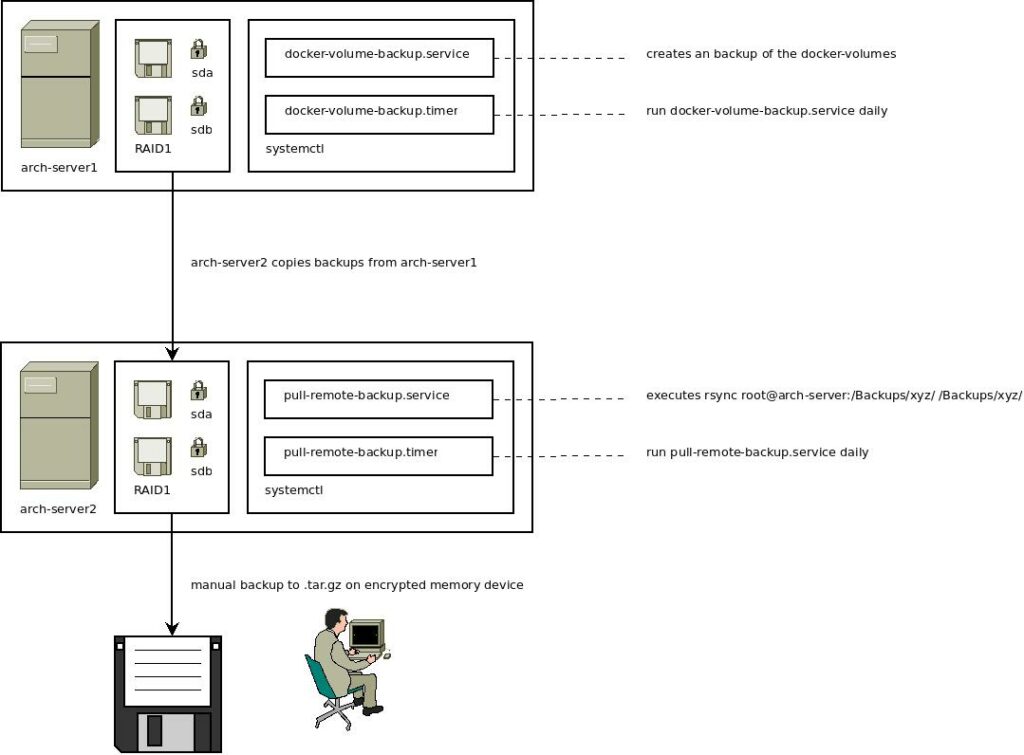
The backup mechanism uses incremental backups with rsync and stamps directories with a unique hash. For more details on the backup scheme, check out this blog post.
👨💻 Author
Kevin Veen-Birkenbach
📜 License
This project is licensed under the GNU Affero General Public License v3.0. See the LICENSE file for details.
🔗 More Information
Happy Backing Up! 🚀🔐